Microsoft · in partnership with SharePoint Premium
Docufy
Docufy reimagines contracting as human–AI collaboration, where metadata extraction, clause governance, and risk analysis accelerate business decisions without compromising security. Embedded entirely within M365, it cut the cost of digitising a contract type from 3–6 months and $300–500K of engineering to a target of under 14 days. Review dropped from weeks to hours.
Role
Design Lead
Team
2 designers + 1 researcher+2 designers from SharePoint Premium
To comply with my non-disclosure agreement, I have omitted and obfuscated confidential information in this case study. The views here are my own and do not necessarily reflect those of Microsoft or SharePoint Premium.
A contract takes nine weeks. Almost none of it is work.
That was the finding the whole project turned on. Press With Docufy to see what the redesign removed.
Microsoft creates roughly 300 agreements on a slow day and 2,000+ at fiscal year end. At that volume, eight weeks of queue per agreement isn't an inconvenience — it's lost deals, expired offers, and vendors who move on.
~9 weeksaverage approval cycle
1.5Magreements in the repository, growing 10% a year
623templates, 10–15k clauses, managed manually
$300–500Kto digitise one contract type, over 3–6 months
Docufy rebuilt that lifecycle inside Microsoft 365, with Azure Purview holding governance and retention. Nothing leaves the compliance boundary, including during signing.
Why nine weeks happens: template drift, and what it costs
The failure that best explains it is template drift. Someone downloads a Word template to their desktop. Legal later changes one clause — a non-compete goes from one year to two. Now two versions exist, and agreements keep going out under the old terms, signed and binding, for as long as that copy survives on someone's laptop. Nobody did anything wrong. The system simply had no way to make the current version the one you actually use.
Underneath that: 1.5 million agreements in the repository growing 10% a year, and a stack that didn't talk to itself — a third-party CLM for lifecycle, SharePoint for storage, Word and email for the actual work. The technical build used SharePoint Premium's content AI services for extraction and classification, with Azure OpenAI behind the reasoning.
My role, and where this started
I owned the Word Add-in end to end — where agreements are written, reviewed and signed, and where every human–AI interaction in this case study lives. By the time SharePoint Premium joined, I was directing four designers across two orgs, which made consistency the real problem: Docufy had to read as one system across a Word pane and a SharePoint app, while still reading as Word. I set the design strategy and the trust standards both surfaces shared. They were adopted org-wide.
The full remit: what I owned, directed, and built myself
Owned: the human–AI interaction model (metadata extraction, clause governance, playbook review)
Owned: the Adaptive Card framework and conversational UI in the add-in
Directed: shared design strategy and trust/transparency standards across both surfaces — how confidence is shown, how a model's output is labelled, what a person can always override
Directed: critique and design review across four designers — two on Docufy, two from SharePoint Premium
Partnered: with the Word team on interaction consistency inside the host application
Partnered: daily with PM and engineering across SPP and Microsoft Digital — grooming, feasibility, and shipping
Partnered: with a UX researcher on validation with HR, legal, procurement and finance
Built: my own tooling — AdaptiveLens, a Figma plugin on OpenAI + Gemini, and coded React prototypes on synthetic data for usability testing
Day to day I worked directly with the PM and the engineers rather than through a handoff — sitting in backlog grooming, prototyping in React against the real component library, and settling feasibility questions in the same conversation where the design question came up.
Where it started: a 2023 hackathon, and the demo that got it funded
The question was whether Microsoft could build an AI-powered contract system in-house, entirely within M365, instead of licensing a third-party CLM. I joined as design lead with one PM and three engineers, mapped the end-to-end flow with them in FigJam, and we built a working skeleton in a week. That demo reached the senior leadership team and became a funded cross-org initiative.
Hackathon POC · 3:27Rough on purpose — it only had to prove contract intelligence could work inside Word rather than in another external tool. It did, and it got funded.
What it became
Eighteen months later the same idea was on stage at Ignite as a product, in partnership with SharePoint Premium. Worth watching this against the hackathon clip above — the distance between them is the design work.
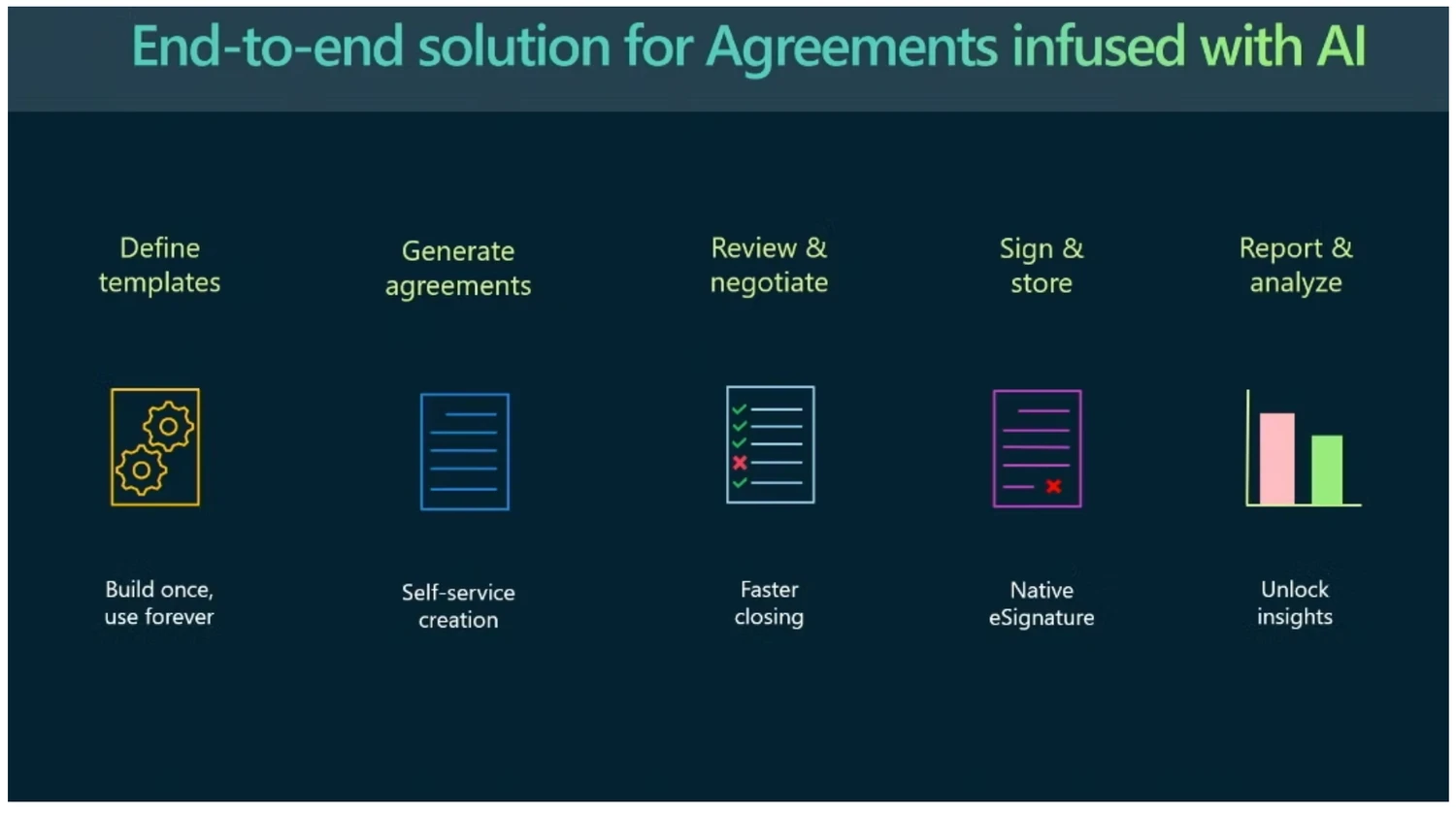
Six flows carried the product end to end — template through signature, with every document staying inside the Microsoft 365 boundary the whole way.
Template creation
Legacy Word templates become structured, metadata-rich models, with AI detecting and tagging the variable fields.
Clause governance
A central library of approved clauses and snippets, with deviation detected when someone edits the text.
Deviation analysis
An edit to governed language is compared to the approved clause and explained in terms of what it means, not what characters moved.
AI-assisted review
Risks, missing clauses and compliance gaps surfaced against the company playbook, each with a plain-language reason.
Approval & signature
Review, approval and e-signature routed entirely within M365. Documents never leave the security boundary.
Lifecycle dashboard
Status, obligations and relationships across every agreement, giving admins oversight across departments.
The architecture underneath those six flows
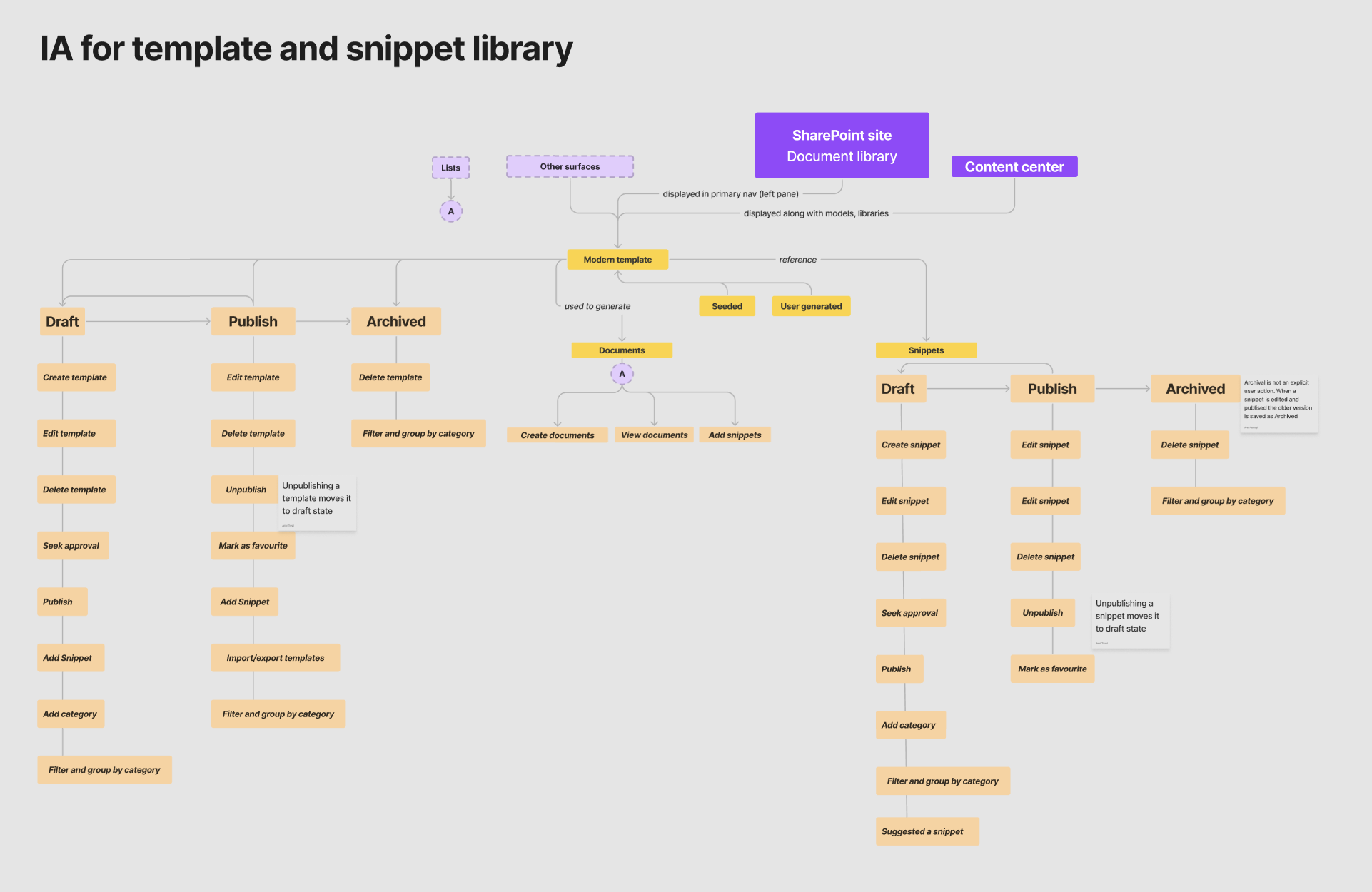
Those flows only hold together if templates and snippets share one lifecycle, and that was mine to design. Both are content objects with the same three states — draft, published, archived — the same governance actions hanging off each state, and the same entry points from a SharePoint document library, the Content center, Lists and other surfaces.
IA for the template and snippet library — the symmetry between the two columns is the point. Open full size ↗
The decision I'd defend is that symmetry. A snippet is a smaller thing than a template and it was tempting to give it a lighter model, but anything a legal team governs needs the same approval path and the same audit trail regardless of its size. Learning the lifecycle once, then applying it to both, is what kept clause governance from becoming a second product. Two behaviours are worth reading in the annotations: unpublishing moves an item back to draft rather than deleting it, and archival is never an explicit user action — editing and republishing saves the previous version as archived, so nobody has to remember to keep history.
Where AI actually earned its keep
"AI-powered" is easy to claim and hard to justify. Three capabilities carried Docufy, each solving a problem with a real price tag. The pattern underneath all three: the model does the first pass, the human keeps the judgement, and the consequence of a change is shown before it's committed.
0 · The components underneath all of it
Before any of those three could be shown, they needed somewhere to live — and the constraint was severe. Docufy runs inside Word, alongside SharePoint Premium, so nothing could look like a guest. I built the component library for the add-in against Microsoft's own patterns: every panel, every state, matched to how M365 Word and SharePoint Premium already behave.
The add-in component library · 0:47Every panel drawn in both its states — Snippets open and collapsed, Create template from field definition through approvers and signers. Consistency with Word and SharePoint Premium wasn't a finishing pass; it was the constraint the components were designed under, because an add-in that feels foreign inside Word doesn't get used no matter what the AI does.
1 · Template decomposition
From research Metadata inconsistency · serves the Organizers
Digitising one contract type meant reading a 50–100 page template line by line, marking every variable by hand: $300–500K and three to six months, across 623 templates. AI proposes the fields instead.
Which moved the design problem rather than removing it. Detection isn't the hard part — review is. So every suggestion carries what a reviewer needs to decide in seconds: the text it matched, how many places it occurs, and where the replacement comes from — a governed field from legal's library, or one the model wrote.
Word Add-in · 0:21Turning a legacy NDA into a governed template. No audio — loops.
Why provenance is on every row: library field vs. AI generated
Suggestions split into library fields and AI generated fields because those carry different risk — a field from legal's (CELA) library is already approved language, while a generated one is a proposal and nothing more. Every generated suggestion is labelled AI generated content may be incorrect, with a thumbs up or down beside it, so the reviewer is told what they're looking at and has somewhere to put the correction. Neither is decoration: they're what makes accepting forty fields a decision rather than a formality.
The other half of the job is authoring a clause deliberately — turning a passage into a governed snippet the company draws from. The AI proposes the name, the type and the variables inside it. What it doesn't decide is who may change it.
Negotiable and editable look like form filler and are the entire control model: set once by the person accountable for the clause, they decide what happens to somebody else's edit weeks later, in a different part of the product. This is where the Organizers' control lives — and what buys the Doers their speed downstream.
What each setting does to an edit made weeks later
Lock both and the text can't drift — an attempt routes to the clause owner as a request. Allow editing but not negotiation and the deviation notice in §3 fires mid-sentence. Leave both open and nothing fires at all: correct for a commercial term that should vary per deal, and quietly dangerous for anything legal is accountable for.
2 · The playbook first pass
From research Compliance and accountability · serves the Organizers
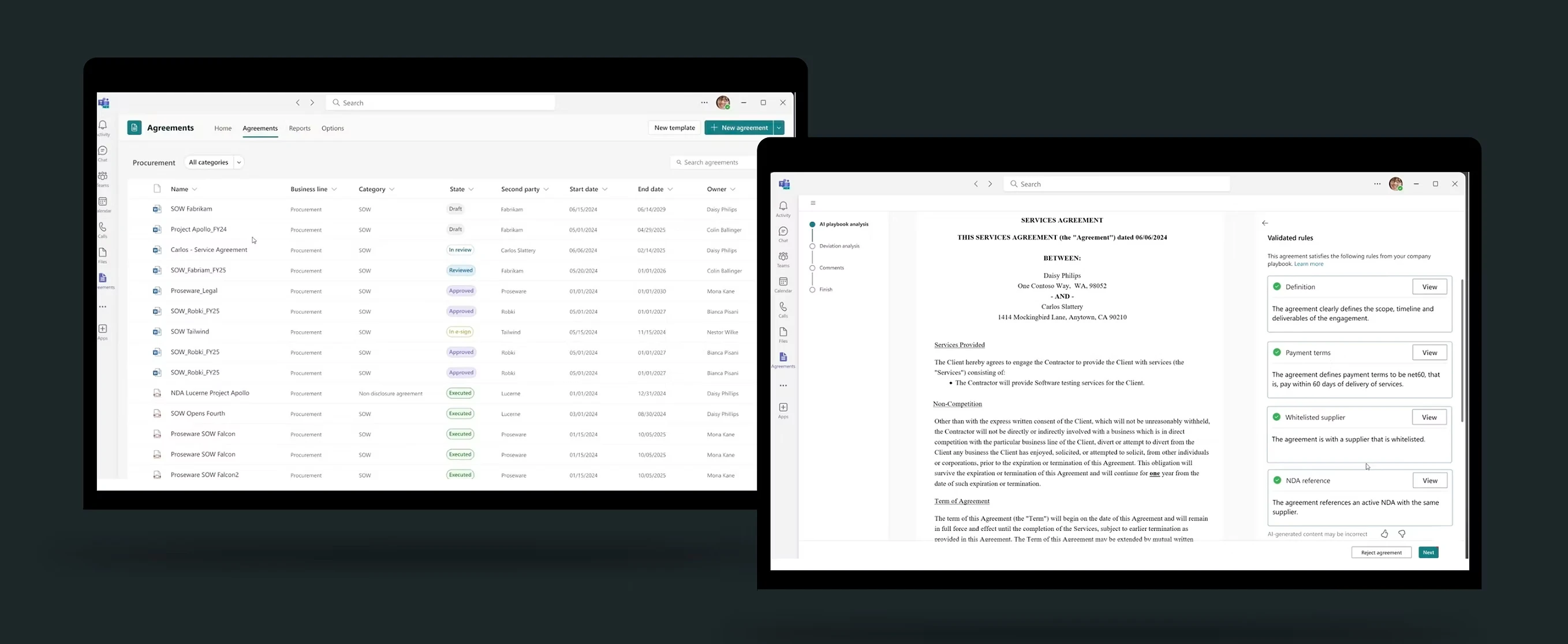
Every legal department has a playbook — the standing rules an agreement must satisfy. Those rules moved into the system, and the AI applies them before a reviewer opens the document. On the services agreement below that's 25 rules, 20 of which pass. Five don't, and they aren't equivalent: two are high risk — a missing limitation-of-liability clause, and a non-solicit that shouldn't be there — and three are low, like an NDA with no stated expiry.
The design argument is about the twenty that passed. Hiding them buys a tidier screen and an untrustworthy one: a reviewer who can't inspect what the AI approved has no basis for believing what it flagged. So the passes collapse to one line they can open on demand, the violations lead, and risk tier decides the order. This is where weeks of review became hours.
Word Add-in · 0:32Playbook analysis on a services agreement, then opening the twenty rules that passed. No audio — loops.
The screen that does nothing in a demo — and why it's the point
At the end of that capture the reviewer opens Validated rules and reads back exactly what the AI approved and why: payment terms are net 60, the supplier is whitelisted, the agreement references an active NDA. No violations on it, no demo value. It exists so that trusting the flags is a reasoned position rather than a leap — and the agreement can still be rejected outright at the bottom of the pane.
Review is rarely one person, and the order matters — finance reviewing before legal has settled terms is wasted work. So the reviewer sequence is defined up front, in the template, by the people accountable for it.
Interactive · FigmaThe review flows across personas, and where the review sequence gets defined. Pan and zoom, or open it in Figma.
3 · Deviation analysis
From research AI opportunities — the “why” behind a document · serves the Doers
The capability I'd defend hardest. Edit governed language and the system explains what the change means, not what characters moved — and it runs while you write, not three weeks later in review.
The canonical case: IP ownership goes from “owned solely by the Client” to “jointly owned”. Four words. A character diff renders that accurately and tells you nothing.
Why timing is the design decision, not the detection
What a non-lawyer needs to know is that the Client just gave away exclusive ownership of everything produced under that contract, and that it can't be undone after signature without an amendment. Nothing in a diff says that.
Running it at the moment of the edit rather than at review is a decision about where control belongs. Feedback three weeks later reaches someone who has moved on, in a document they no longer remember writing; feedback mid-sentence reaches the person making the choice while they're still making it. It also means most deviations never reach legal at all.
Demonstrated live · from 34:50The clause-deviation flow end to end, in the public session.
Never thought I'd say the word cool for legal agreements — but this comes really close.
Mohit Chand, Group Engineering Manager, Microsoft Digital — Ignite 2023
What the research asked for
Two weeks of contextual inquiry with 16–18 employees across HR, legal, real estate, finance and records — watching real workflows rather than asking about them, because nobody reports the waiting.
Volume and complexity
High document volume led to confusion, duplicate files, and version conflicts, especially across global teams.
Both personas
Compliance and accountability
Legal and finance needed strict control over permissions, version history, and audit trails.
Organizers
Findability and relationships
Users struggled to locate documents or see how one related to others — contracts, amendments and renewals were disconnected.
Doers
Metadata inconsistency
Manual tagging caused errors that later broke compliance reports and retention policies.
Organizers
The insight that set the direction
Participants didn't ask for faster search. They wanted the why behind a document — what it obliges them to, what deviates, and what it relates to. That's a reasoning problem, not a retrieval one.
Both personas
Two users, opposite needs. Organizers — legal, procurement, compliance — want control. Doers in HR or finance want speed. That reads as a conflict until you notice they're asking at different moments: Organizers want control before anything is drafted, Doers want speed during. So control moved upstream into the template itself, and everything downstream feels fast to a Doer precisely because an Organizer already constrained it. Nearly every decision in the creation flow is that same move.
Both personas in full: what each wants, and what blocks them
The Organizers
Legal, procurement & compliance
Accountable for templates, compliance, obligations and metadata accuracy across the organisation.
Wants
Centralised templates, clauses and signed agreements
Standardised metadata and fewer manual tagging errors
Visibility into approval status, risk and ownership
Blocked by
Templates scattered across SharePoint sites, Teams folders and a third-party CLM
Inconsistent metadata and missing audit trails
Time-intensive manual clause updates
The Doers
HR, finance, real estate & beyond
Non-legal employees who initiate agreements — vendors, NDAs, SOWs — without being experts in compliance language.
Wants
To create an agreement quickly from an approved template
To route for review and signature without chasing people
To understand key obligations without a legal dependency
Blocked by
Confusion over which template version is “the right one”
Long approval chains and unclear review steps
Manual data entry and tagging in Word
Working it out
Most of the hard thinking happened before any interface existed — deciding what a “content block” actually was, what a template owner needed to control, and how much metadata to expose before it became noise. Three questions framed it.
Template creation and governance
How might we convert 100-page Word templates into structured, reusable components with built-in metadata and clause tracking?
Clause visibility and explainability
How could users instantly see where AI made an assumption, or flag a clause that differed from legal's approved language?
Document relationships and lifecycle
How could the system show the connections between NDAs, renewals and amendments as a living ecosystem?
Working through what a block is. The sticky on the right lists the worst case — six or seven variables plus seven kinds of metadata — which is what forced progressive disclosure rather than a flat form.The conditional-clause case — a component that appears or hides depending on the user's region — is the one that decided the information architecture. Progressive disclosure was the answer to a real constraint, not a style preference.
Designing in code
Two problems here couldn't be solved in a design file. When the tool I need doesn't exist I build it; when a design can't be judged from a picture I code it and put it in front of people. That's how I work generally, not a one-off on this project.
When the tool doesn't exist, build the tool
Answering “is this Adaptive Card buildable?” meant digging through the component library or booking an engineer — so the question went unasked and came back later as rework. I built AdaptiveLens, a Figma plugin on OpenAI and Gemini models that turns a frame into schema-valid JSON, names what won't render, fixes it, and shows you the React version right there.
Provenance — design → schema → render
select any element to trace it
1 · Figma frame
Approve template / card
Approve template
Requestor · Type · Region
Reason for creation ▭
⚠ Clause deviation notice
[ Approve ]
[ Save as draft ]
2 · Generated Adaptive Card JSON
3 · Rendered in Word
What the plugin changed about when feasibility gets decided
The triptych above is the loop it closed — frame, schema-valid JSON, and the card as the client actually draws it, all three in sync and checkable before a line of production code was written.
Feasibility stopped being a gate at the end of design and became something you checked mid-thought, which is the only point at which it's cheap to act on. It's the same instinct behind the MCP workflow I run now — Figma, VS Code and Copilot against one live component state — and behind the agent answering questions on this site.
AdaptiveLens on a real frame. It reports how it read the design (analysis method: ai-vision), validates the output, and names what won't render — here two unsupported Input.Text elements. Fix errors resolves them and re-renders, which is the state on the right. Telling a designer their card is invalid is a bug report; fixing it in place is a tool.
It stopped being mine fairly quickly. Other designers picked it up for their own Adaptive Card work across the org, which is the outcome I actually wanted — a feasibility question that used to cost an engineer's afternoon became something any designer could answer in a few seconds, on their own, mid-design.
Prototyping on synthetic data, then testing on it
The second problem: Figma could show a dashboard holding twelve contracts. It could not show one holding twelve hundred — which is the only version that tells you whether the design works.
So I have a process, and I run it on everything now: generate synthetic data matching the real distribution rather than the convenient one, build the screen in React against it, then run the sessions on that running build instead of a clickable mockup.
Below is the same component under both conditions. Twelve tidy rows answer no questions. Five hundred realistic ones surface five decisions I'd otherwise have shipped without making — select any flagged row to see which.
Design, code, and the running build — the same screen in all three. The middle pane is where the design got tested against data it hadn't been drawn for.
A participant getting lost is data. A participant hitting the edge of a prototype is noise.
What testing on a running build gets you that a mockup can't
Participants sorted, filtered, opened the wrong agreement and backed out of it — none of which a clickable mockup can produce, because a mockup only supports the path you thought to draw. So the feedback was about the design instead of about the seams, and the questions came back real: why is this one red, where did the expired ones go, can I see just mine.
The side effect was cheaper handoff. Engineering received resolved behaviour — truncation, empty states, sort order, which column collapses first at narrow widths — rather than a mockup and a list of open questions. The closer design gets to the running thing, the fewer decisions get made by default, and defaults are where AI products quietly go wrong.
Impact
The number I'd lead with is the cost of digitising a contract type — what made intelligent contracting impossible at scale before this, and the figure Microsoft Digital quoted publicly at Ignite.
Before3–6 monthsand $300–500K of engineering, per contract type
→
Target, and close to itUnder 14 daysper contract type — the team’s stated target
623Legacy templates, 10–15K clauses, brought into the system
1.5MAgreements in Microsoft's repository, growing 10% a year
200K+Employees who can create agreements with it
100%Documents stay inside the M365 boundary — including during signing
Adopted across Legal, HR, Real Estate and Finance after the Microsoft Digital pilot, and the blueprint for SharePoint Premium's AI-powered agreement solution — demoed at Microsoft Ignite 2023, design framework adopted org-wide.
What research asked for, and what actually shipped — including what didn't
Five insights came out of the foundational study. Two shipped outright, two landed partly, and one I scoped into a later phase. Closing the loop honestly matters more than claiming a clean sweep — the gaps are as informative as the wins.
Volume and complexityBoth personas
Version conflict was killed at the source: one governed template, centrally published, with the current version the only one reachable. Duplicate executed agreements remained a repository problem rather than an authoring one — outside what this work touched.
Partly
Compliance and accountabilityOrganizers
Documents never leave the M365 boundary, including during signing, so permissions, retention and eDiscovery stay governed by Azure Purview rather than re-implemented and half-trusted. The playbook first pass added a reviewable record of what was checked and what failed. Version history and audit-trail surfaces were platform capabilities we inherited rather than designed.
Shipped
Findability and relationshipsDoers
The honest answer: partly, and later than it should have been. The agreements app gave one place to look instead of four, and the dashboard surfaces status and obligations. Representing an agreement's relationships — this NDA, its two amendments, the renewal that supersedes it — was scoped into the lifecycle dashboard and is the thread I'd pick up first if I went back.
Scoped later
Metadata inconsistencyOrganizers
Fields moved into a central library and are bound to the template rather than typed per document, so tagging stops being a manual act. AI template decomposition made converting 623 legacy templates tractable. See it running →
Shipped
The “why” behind a documentBoth personas · north star
Deviation analysis answers what deviates and what that means, in plain language, while you draft. Obligations surface in the dashboard. Relationships did not ship in my phase — a third of the north star, and I'd rather say so than imply otherwise. See the deviation flow →
Partly
Built on the same design system: Legal Ease — AI auto-tagging across 100K+ litigation hold documents, SUS 90/86, and an estimated $475K+ and 1,000+ hours saved annually.
Agent
Live modelPowered by GPT-4o
Grounded in Sayena's case studies, not a canned bot. Billed per question — so make them good ones.